
Appearance
Blueprint field overview and tile entries
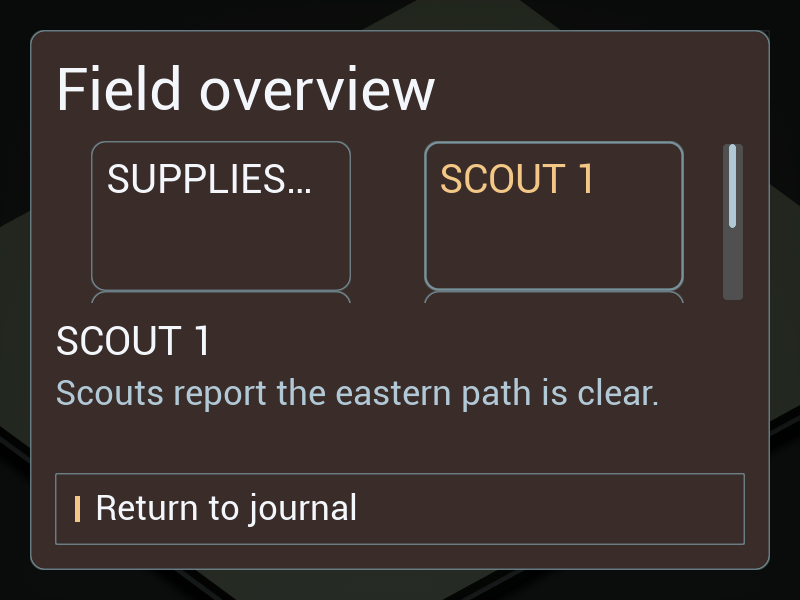
From either playable HUD, open Pause → Field journal → Field overview. The same saved WBP_FieldCards presents the current RTS expedition or RPG party models. Select a card to read its full current description; Return to journal restores the previous screen. This is a player interface, with no inventory or gameplay rules in the UI plugin.
Build the screen
Create a Widget Blueprint deriving from IFScreen. Add an ordinary Tile View, set Entry Widget Class to your IFEntryWidget Blueprint, and put it in a bounded Fill slot. WBP_FieldCards uses 208 × 120 logical-unit entries; Unreal determines the number of columns from available width. A separate InterfaceForge Scroll Box holds the selected detail entry so full text can scroll independently.
Implement Initialize Screen and call its parent with Data. Call Clear List Items, then Get UI Model and Add Item for the source's model keys. The sample uses Resources, Selected, Objective, Queue and Notice. Its existing adapters translate these to expedition or party data. Supply stable model objects; changing a view does not require recreating gameplay state.
Set Initial Focus to the live Tile View, then Set Selected Item to the first model and Initialize Entry on the detail widget with that model. Bind the Tile View's On Item Selection Changed event. Use Branch on Is Selected, then Initialize Entry with Item on the true branch. Ignore an old item's deselection event when assigning the new detail. InterfaceForge unbinds the previous model before subscribing to the new one.
flowchart LR
    A[Initialize Screen: call parent] --> B[Clear List Items]
    B --> C[Get UI Model → Add Item]
    C --> D[Initial Focus → Set Selected Item]
    D --> E[Initialize detail Entry]
    F[On Item Selection Changed] --> G{Is Selected?}
    G -->|True| H[Initialize detail Entry with Item]
Make a card Blueprint
WBP_FieldCard is an independently editable copy of the example's journal entry. On Entry Refreshed reads Entry Data, casts to IFPresentationData, and uses Set Text. Its title disables Auto Wrap Text and uses Overflow Policy = Ellipsis in a bounded Fill slot. This deliberately provides a compact preview; the selected readout retains the complete title and detail. Text enlargement does not remove the full description.
On Entry Selection Changed updates the title role and surface outline through Refresh Appearance. On Entry Released clears text and selection styling. These are the same public lifecycle events used by List View entries. Changing the entry class or Designer tree requires no plugin source edit.
Live updates, themes and cleanup
Change fields on the external model and call Notify Data Changed once after the edits. The realized card and selected detail update through their existing subscriptions. Avoid rebuilding the tile collection for each text change.
Connect On Theme Updated → Apply Theme to List View, passing the Tile View and event Theme. The engine Tile View inherits List View; its scrollbar and the entry components use the existing theme system. Local theme overrides remain widget-owned.
Connect On Deactivated → Clear List Items → Release Entry for the detail widget. The sample's Return control calls Request Back. The journal's Field overview button calls Get Root Layout → Push Screen, Menu layer, WBP_FieldCards, with the journal's Screen Data. Reopening starts from fresh selection and binds the current source.
Keyboard/controller directional navigation follows the actual grid: horizontal movement between columns, vertical movement between rows. Shared input presentation applies to this custom screen. Current expanded source checks route actual Slate pointer down/up events through the card hit area, controller-family changes above a modal, and modal Back → grid focus → journal launch-control focus. These are software input tests; physical controller testing is deferred. Current source checks are recorded separately from packaged, newer-engine and Shipping acceptance; this recipe does not claim those gates are complete.
Current three-engine source/cooked runtime record records24current card reports and24full-flow regressions, actual commands, rejected diagnostics and remaining verification.
The Field overview/world-choice labels and default dialog text are included in the refreshed271-entry Turkish catalog. Refreshed-label runtime evidence verifies24 source/exact Development-package cases across UE5.6.1,5.7.4 and5.8.3, with32 clean Blueprint compilations per engine. The owned runtime language switch starts after English startup; it does not close the known UE5.6 Turkish-editor-startup gate. Earlier L2 and Shipping records retain their original revisions and scope.