
Appearance
Build a working ability browser from public UI widgets
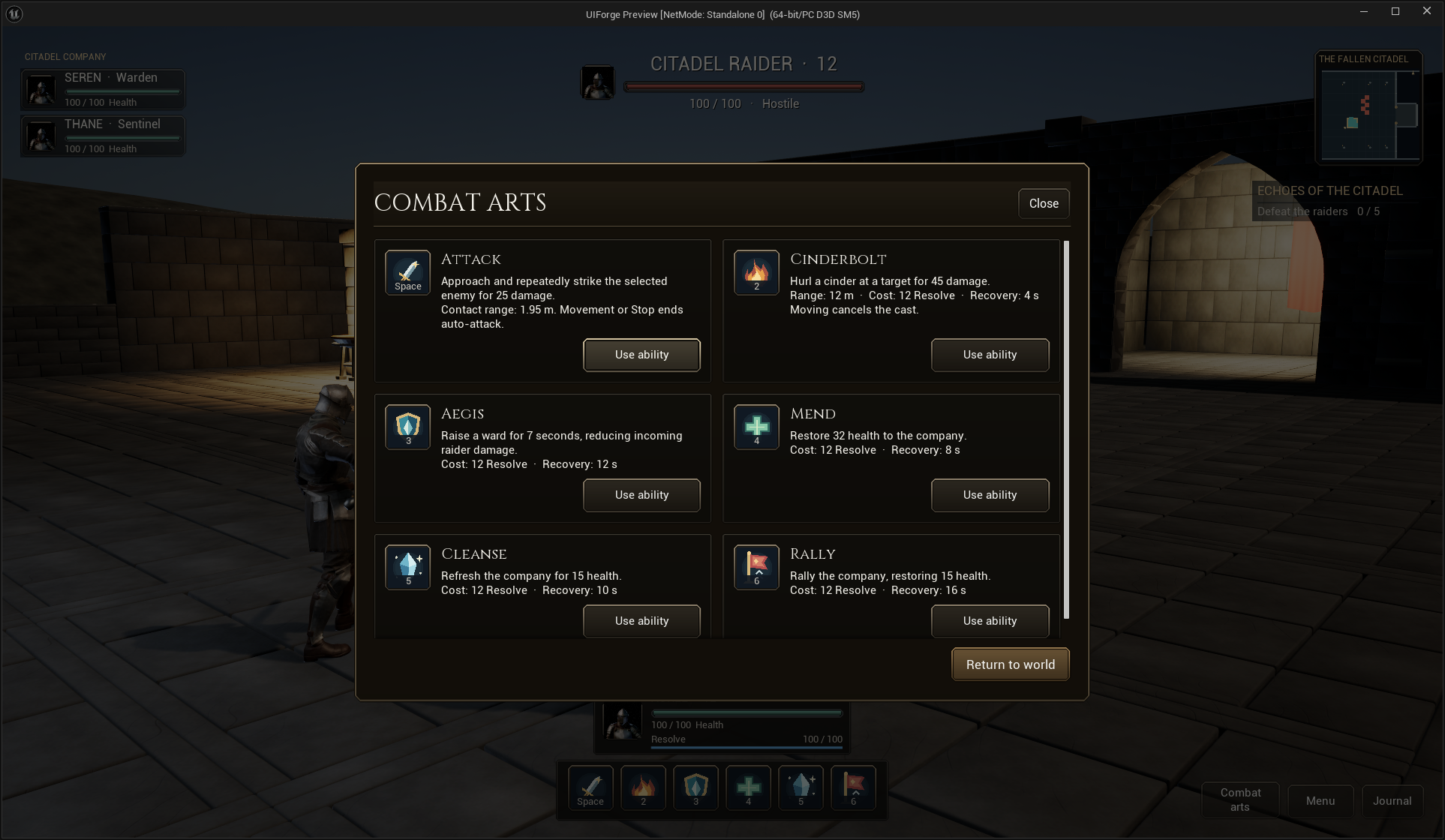
The Emberfall Combat arts button opens an actual game window showing the six skills used by its action bar. Each card has an icon, the applied key prompt, description, cost/recovery text, and a Use ability action. Using an available art returns to gameplay and executes that same skill. A recovering or otherwise unavailable skill keeps its reason and cannot execute. This example supplies local encounter rules; UIForge supplies presentation, binding, navigation and screen management.
The saved Designer assets live under /Game/ForgeExamples/UI/RPG:
| Asset | Purpose |
|---|---|
| WBP_IFRPGAbilityBook | IFScreen: scrim, fitting frame, header, scrollable two-column cards, Return |
| WBP_IFRPGAbility | IFReadoutEntry: icon, mapped prompt, countdown, original Sakura-style center tint |
| WBP_IFRPGAbilityCopy | IFReadoutEntry: wrapped title and gameplay description |
| WBP_IFRPGLayout | HUD profile/regions and Combat arts command |
No runtime widget tree is generated by the editor authoring utility. These are normal editable Widget Blueprints. The example's ForgeExamples adapter handles AbilityBook and UseAbility1…UseAbility6. Those names are example actions, not hard-coded plugin requirements. Your game supplies its own adapter and validation.
Compose a card in Blueprint
- Create a Widget Blueprint derived from IFScreen. Use a Canvas with a full-screen scrim and a Scale Box set to Scale To Fit / Down Only. Inside it, use a bounded Size Box and an InterfaceForge Surface, Surface Style = Window.
- In its Vertical Box, place a Header surface, a flexible Scroll Box, and a footer. Keep the close/return buttons on Auto slots. Set Request Screen Back on IFCommandButton to share CommonUI's Back path.
- Make a card from Surface Style = Row, with a Horizontal Box containing an ability entry and a text entry. Add an Auto-sized Use button below, aligned right. A Fill spacer above it aligns paired cards when descriptions have different heights.
- On the icon entry set Model Name = Ability3, Mapping Name = IF_Ability3, Entry Action Name = UseAbility3. Set its atlas Icon UV Min / Max or use a separate texture. On the description entry set Model Name = Ability3Tooltip. Leave Tooltip Model Name empty on the book controls because the complete description is already visible; the action bar retains its contextual tooltips.
- On the Use IFCommandButton, set Model Name = Ability3, Action Name = UseAbility3, Use Model Label = false, Label = Use ability. Its context, availability and reason come from that stable model. Do not reconstruct data every frame.
- Set the screen's Initial Focus Name to a usable button such as Use0, and Fallback Focus Name = Return. Push it through Get Root Layout → Push Screen, Layer = Menu, Data = your IFDataSource object.
Expected result: the window participates in the same input presentation, cursor, focus, back navigation, theme and transition behavior as settings and pause. Changing a registered key updates the icon prompt through Enhanced Input. Opening a modal keeps the window's data alive while focus belongs to the modal.
flowchart LR
    A[Combat arts command] --> B[Adapter: open IFScreen with its source]
    B --> C[Entries subscribe to stable skill and description models]
    U[Use ability / mapped prompt] --> V[Request UIAction with current context]
    V --> D[Game adapter validates active screen, actor state and skill availability]
    D --> E[Close book and request existing gameplay skill]
    E --> F[Actual resource / cooldown changes]
    F --> C
Supply your own gameplay
Implement IFDataSource → Get UIModel to return stable presentation objects, and Request UIAction to validate requests. For an IFPresentationData, edit Title / Detail / Icon / Enabled / Unavailable Reason, then call Notify Data Changed. Use Set Fraction for lightweight cooldown/resource updates. The convenience entry subscribes/unsubscribes during initialization, recycling and cleanup. Your own Blueprint can instead implement the IFEntry interface and draw any tree.
UI actions are requests. Validate actor lifetime, resource/range/cooldown state and authority in your game. Emberfall additionally rejects the use action when its book is inactive, transitioning, behind another screen, or bound to another source. A disabled UI button is useful feedback and does not replace validation.
For a networked game, show or close the window locally and send a validated gameplay request through your existing owned actor/RPC architecture. This local example is not an MMO server or replicated ability system. Inventory, equipment and talent progression are outside this plugin.
Change its look without changing the game
Duplicate WBP_IFRPGAbilityCopy to replace its typography or layout, or author your own IFEntryWidget / IFEntry Blueprint. Replace the card's entry class in Designer, keeping the model contract. Put project-wide brushes under a theme's Surface Styles / Button Styles; use Theme Override for one control. Call Set Theme to switch the whole live tree between Emberglass and Moonsteel. Set Region Widget replaces an entire HUD region with your own instantiated widget; Refresh Screen Binding binds a newly attached IFReadoutEntry to that screen's source.
The native IFCenterTint path preserves the center-origin tint reproduction. Resource bars use the separate Forge Progress / Linear art path. See button, resource and window styling, cooldown parameters, and game integration.
Current verification
The competitive pass records 13 runtime checks for actual CommonUI use, current stable model contexts, resource consumption, cooldowns, unavailable activation, malformed action rejection and Back. An early test found and fixed an action accepted during the closing transition. The separate customization receipt exercises region replacement, live theme changes, and a saved Blueprint-only source/entry/button interaction. Current native packaged mouse input opens the book and Use executes actual Aegis, with the applied Y prompt and real resource/recovery updates. Responsive review includes the full six-card window at1280×722. The active quality ledger records all test limits. Physical controller, touch and actual disconnect testing remain deferred.